


Web App
GNAMMM: the digital menu that becomes the restaurant's back office
A multi-tenant SaaS platform for restaurants: the customer opens the menu by scanning a QR code, the owner runs the menu, orders, bookings and customers, and the waiter takes the order at the table on a handheld that prints it.

-
active restaurants
-
services in production
-
tables, one single database
-
×
faster order analytics
In summary
In brief
- GNAMMM gives a restaurant three connected things: the digital menu the customer opens by scanning a QR code, the back office for the menu, orders, bookings and customers, and the handheld that puts the same dining room in the waiter's hand.
- Each venue has its own colours, typeface, borders and backgrounds, loaded on the fly from the theme stored in the database: two restaurants running the same code look nothing alike.
- Ten services in production, nine on Google Cloud Run plus the Android app, sharing one single MySQL database of 62 tables.
- The public menu is served by a read-only API, with complete HTML for search engines and a sitemap generated from the database.
- In production since 2025 across 19 restaurants, grown one piece at a time and without ever a maintenance window.
A PDF online does not earn anybody anything
By 2024 the QR code menu was already commonplace: dozens of services turned a PDF into a web page. The point is that a PDF online does not bring a restaurant a single euro more. It does not say which dishes get looked at and not ordered, it does not collect a contact, it does not take a booking, it does not send a ticket to the kitchen.
GNAMMM starts from the menu, the one thing a customer opens willingly without installing anything, and uses it as the front door to the data: every scan is a customer entering the system. It is a decision that shaped the architecture before the first line of code, because the menu has to be very fast and public while the back office has to be rich and protected. Over time they became two different back ends.

The same code, a different look for every venue
The customer’s menu is a web app in React and Ionic, served as a PWA. The path is QR code, page, menu: an app to install would have stopped the customer at the first step.
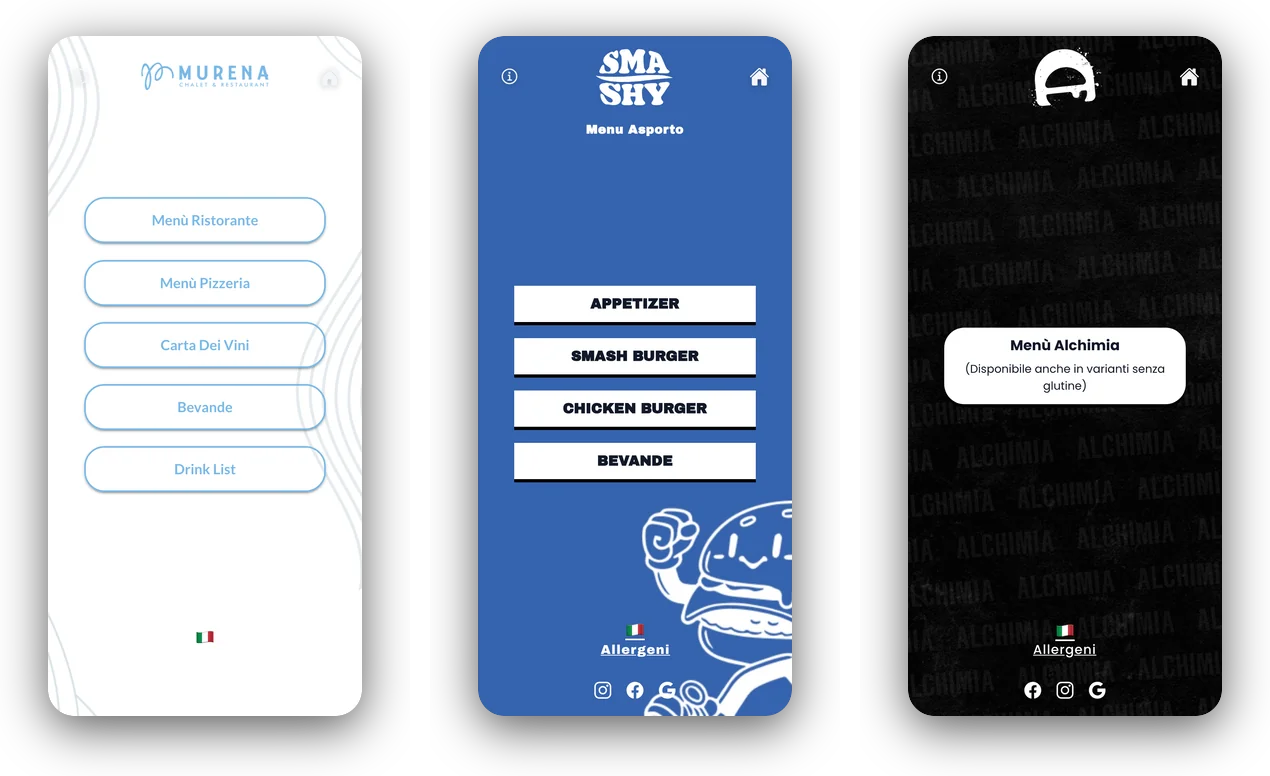
The part that matters is not the list of dishes, it is the customisation. Colours, typeface, border radius, backgrounds and layout arrive at load time from the theme stored in the database, so two restaurants on the same domain look nothing alike. Alongside here is the very same code with three different themes: a fish restaurant, a burger place and a late-night bar.
From the menu to the order, the booking, the review
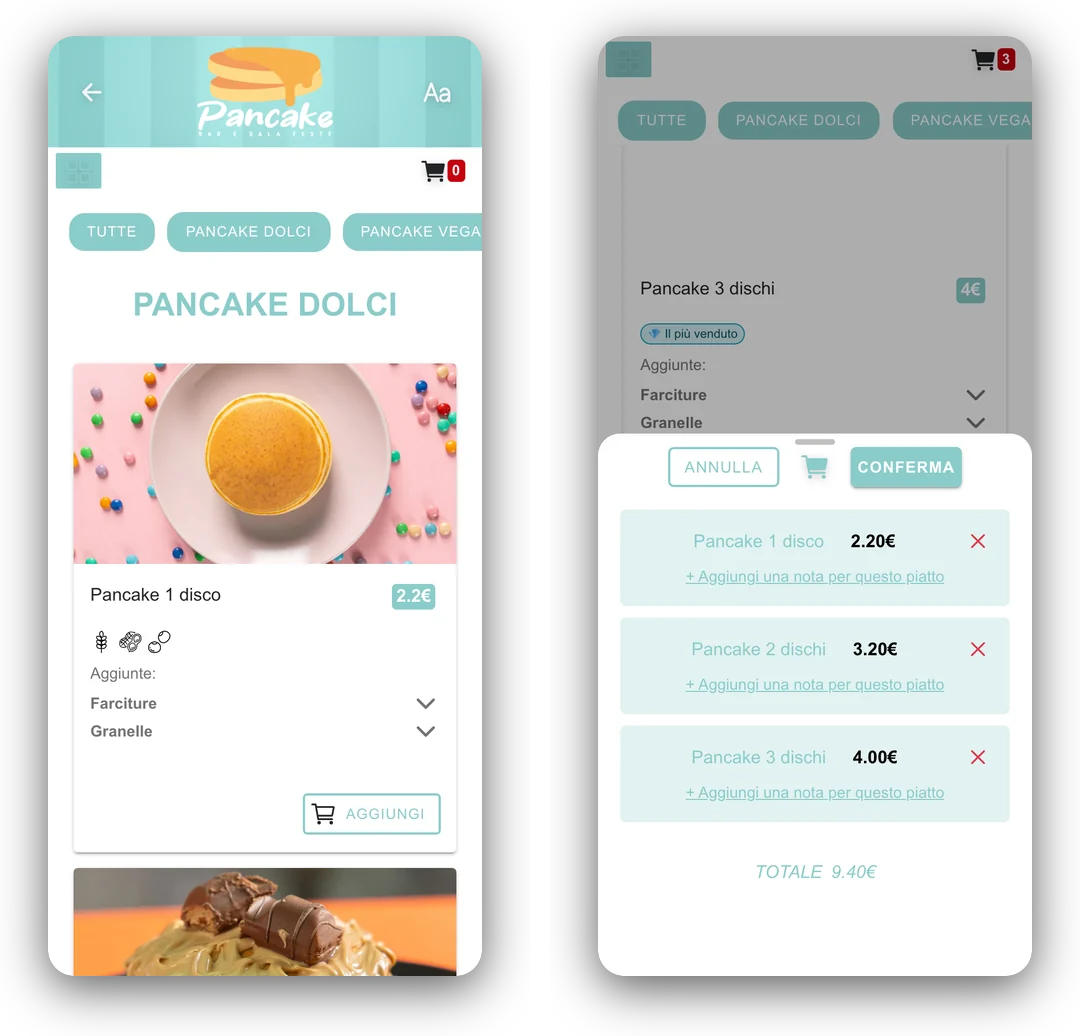
The product page is not a price list row: it carries the photo, the allergens with their icons, the configurable additions such as fillings, toppings and size variants, the badges such as best seller, and the add-to-basket button where the venue has turned ordering on.
From the same menu the customer orders at the table, for takeaway or delivery, books a table and leaves a review. Three journeys that in the back office then became three whole sections, with a basket that also holds notes per dish.


The owner's back office
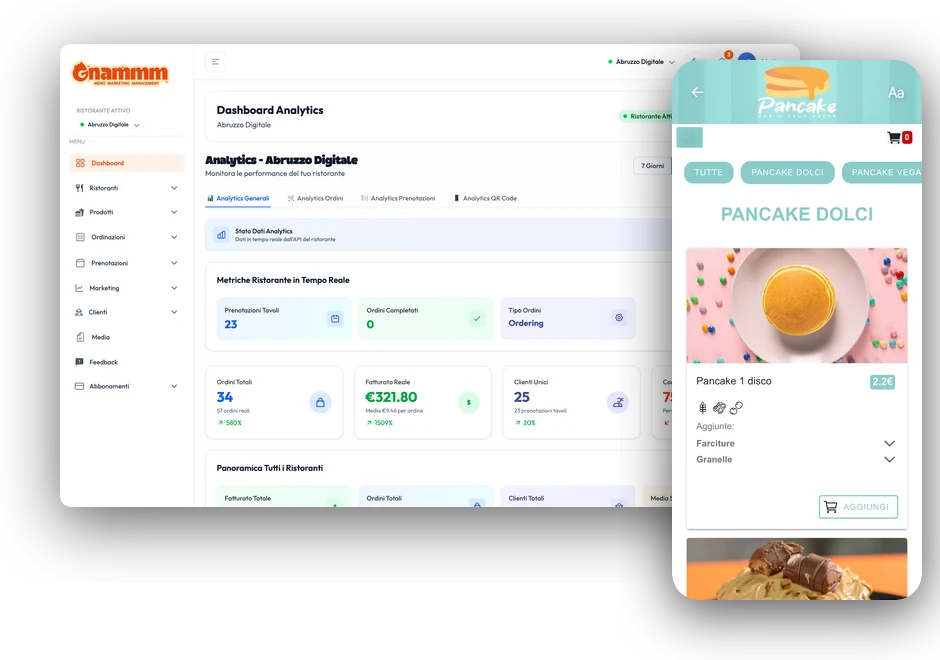
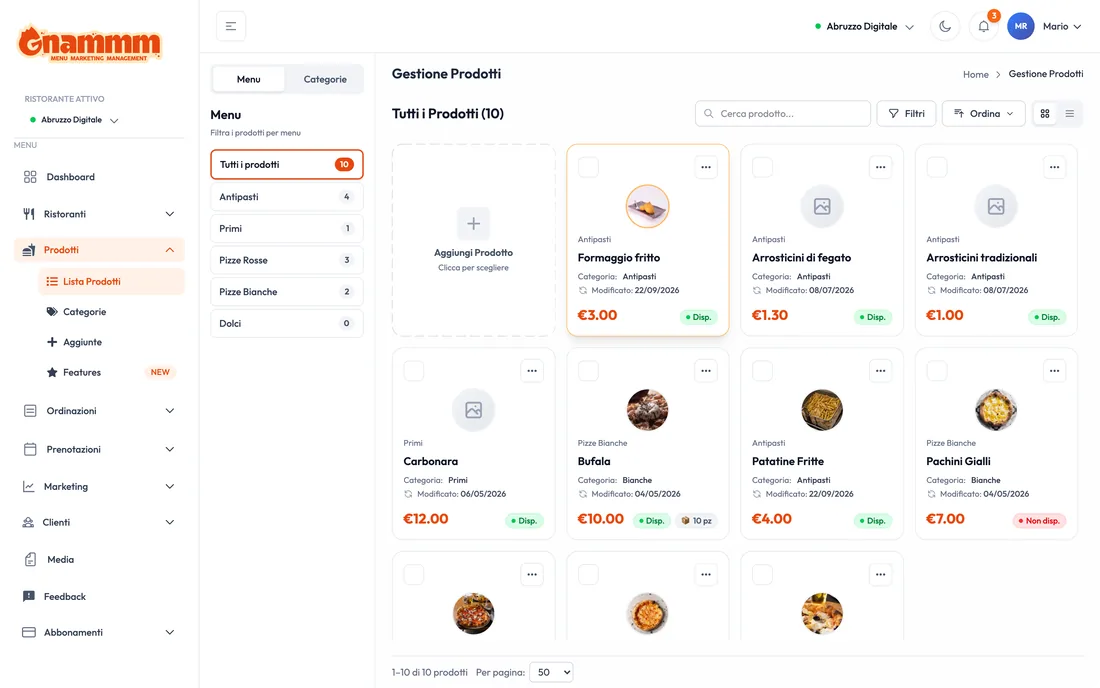
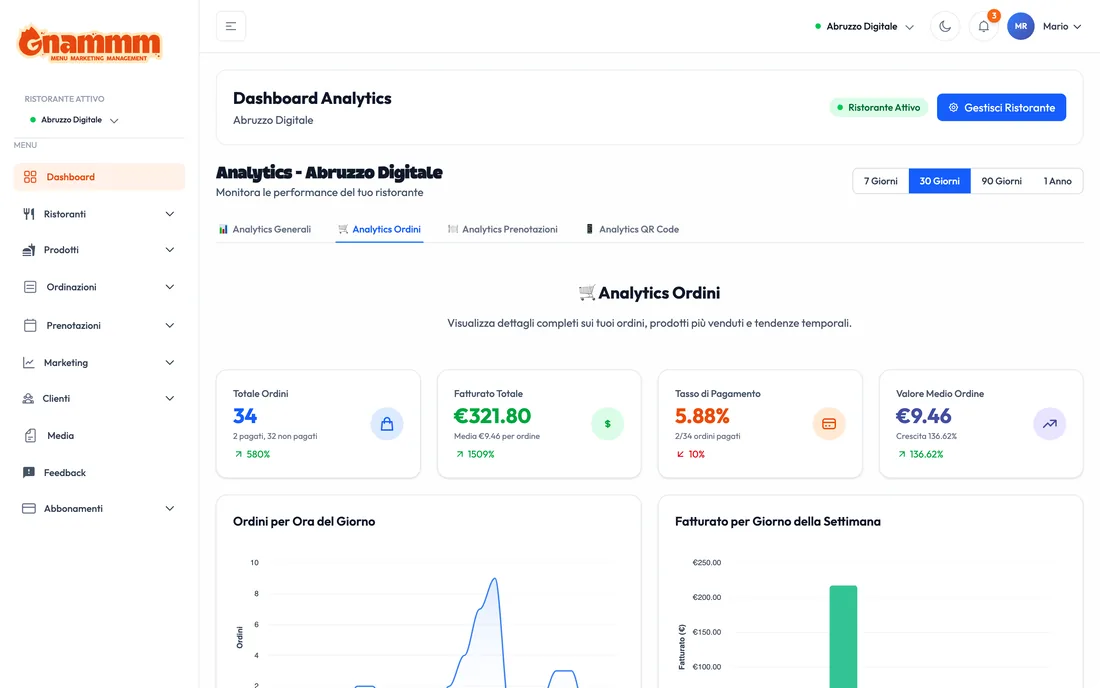
The dashboard is in Next.js 15 with TypeScript and Tailwind: around two hundred hooks, one for every API operation, and some fifty functional areas. The home page is an analytics board with orders, revenue, unique customers and the comparison between all the venues belonging to the same owner, because many clients have more than one restaurant.
Products, menus, categories and additions are reordered by dragging, with filters for availability and stock and a system of attributes (vegan, spicy, gluten free, homemade) that counts 24 common entries plus the ones belonging to the individual venue. Next to that there are the three-column order board split by channel, the rooms with their tables, the bookings calendar, the loyalty scheme, the customer records and the messages over WhatsApp Business.
The theme editor, with a live preview
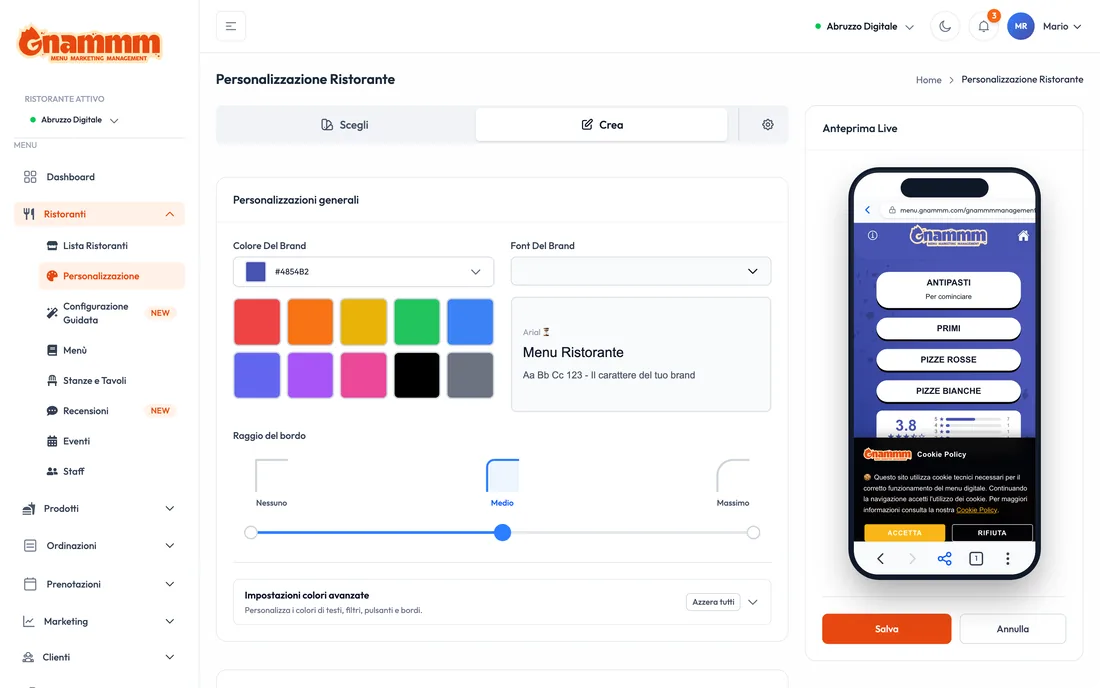
This is the screen I am proudest of. The owner changes the brand colour, the typeface, the border radius and the backgrounds, and sees the result while changing it, inside a simulated phone on the same page. No saving blind, no reload the page and see how it turned out.
The theme is not a stylesheet hand-written for each client: it is values in the database that the menu reads at startup. That is why a venue can change its face without anybody having to release a new version.

A menu in React that Google can read
A page built in JavaScript is invisible to half the programs that index the web. The answer here is dynamic rendering: nginx recognises the program asking for the page and sends it to a Python endpoint that returns complete HTML, with title, description, Open Graph and structured data for the restaurant, the menu and the opening hours. People keep getting the web app.
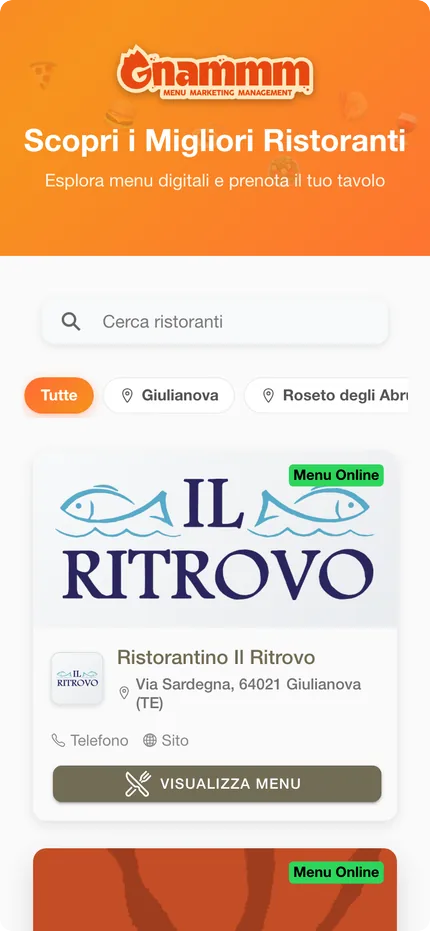
The robots.txt file and the sitemap are generated from the database: a new restaurant enters the sitemap by itself, with nothing to rebuild, and venues with no products, under construction or deactivated stay out. There is also a public page gathering every venue on the platform, filterable by town.
Measure first, rewrite afterwards
In the summer of 2026 the back office had become slow, and the natural request would have been to rewrite the back end. Before writing a line I measured the infrastructure, and the picture was a different one: the back end was running with a single synchronous worker process while the platform was sending it up to 80 requests at once, the database was the smallest instance available, shared by five services and, on top of that, in a different region, and no service had instances always on.
Once the application server configuration was put right, two processes with eight threads each, and the number of database connections reduced so as not to move the queue from one place to another, ten parallel requests went from 879 to 352 milliseconds. Only at that point did I rewrite, and not all at once either: a second FastAPI back end alongside the Flask one, with the routes moved one resource at a time, reads first and writes last. A map saying which back end serves which resource, in a single file in the front end, makes it possible to move a resource, or bring it back, by changing one line. Order analytics over a year went from 110 seconds to half a second: not because of a cleverer algorithm, but because a chain of nested queries became a fixed number of aggregations.
Real time, without a second data store
An order board that refreshes on a timer means tickets seen half a minute late. In the back office there were three abandoned attempts at real time: a piece of code pointing at an endpoint that was never written, a commented-out client, and a server that would not have worked anyway with a synchronous process. I removed all three and built one that works, with Server Sent Events on the FastAPI back end, where an open connection is a suspended routine and not a blocked process.
The two less obvious decisions are these. No second data store: a database dedicated to real time would have meant a double write that can lose orders and a second authentication system to keep aligned. And the stream does not carry the data, it only signals that something has changed: the list stays the single source of truth, so a lost message does not leave the page in an inconsistent state. For bookings, which had no column holding the modification date, a change is recognised from a signature calculated over status, covers, table and time.
The handheld that prints the ticket at the table
The last chapter is hardware. The owners were asking for something a browser cannot give: taking the order at the table and printing it immediately, even with wifi that comes and goes. The handheld is a Kotlin app with Jetpack Compose for an industrial terminal with a 58 millimetre thermal printer, NFC and a barcode reader. The manufacturer does not supply development tools, so the way of talking to the printer was reconstructed from the system program.
The app reads only from the database it carries on board and lets the network update it in the background, so the waiter never waits for a reply from the server. Orders created and status changes go into an outbound queue and leave when the line comes back, with a key that prevents duplicates if the reply gets lost on the way. The handhelds are scattered across the venues, so a new version is something they download and install by themselves.
Ten services, one single database
Today the platform is made of a Flask back end that writes, four FastAPI services serving the public menu, the back office with its real time, the admin panel and the translation of menus with a language model, a microservice for WhatsApp messages, three interfaces, the Android app and the marketing site in WordPress, deliberately kept outside the cloud so that marketing can change a sentence without a release.
The most debated decision is the single database, and it is deliberate: with ten services and a tiny team, ten databases would have meant ten copies of the same table to keep aligned. The price is that a schema change touches five services at once, so the rules are strict: columns always backwards compatible and a mandatory release order, schema first, then the services, interfaces last. Local development, though, stays a single command: a Makefile brings up the database connection, five back ends and three front ends on fixed ports, even across several work sessions at once on the same machine.
The package
What was delivered
- Platform architecture, from monolith to ten services
- PWA digital menu with a theme tailored to each venue
- Next.js back office with some fifty functional areas
- Two read APIs and one write back end, migrated live
- Android app for the handheld, with ticket printing and an outbound queue
- Admin panel and menu translation with AI
- Dynamic rendering, dynamic sitemap and structured data
- Marketing site in WordPress
In detail
Technical details
- Platform: multi-tenant SaaS on Google Cloud Run
- Year: 2025
- Status: In production
- Technologies: Python, FastAPI, Flask, Next.js, React, TypeScript, Kotlin, MySQL, Google Cloud, Web App
The screens come from the production systems: the back office data is that of a demonstration account, the menus are the public ones of active venues. Figures recorded in October 2026.
Let's talk
Do you need software like this?
If you have a process you handle by hand today and would like to automate, tell me about it: we work out together whether it makes sense to build a tool on top of it.
Need something similar? This project is an example of custom web app and business system development. The first meeting and the quote are free: write to me and we will talk it through.